Hardware Repair
Screens, batteries, keyboards, power faults and failed parts on laptops and desktops.
Desktop repair
Laptops, Desktops, Macs and Networks
Sometimes you do not need a specific repair. You need someone who understands computers to look at the problem, explain it clearly and fix it. Our computer technician Melbourne service helps homes and businesses with hardware faults, software problems, networks and setups, whether in person or remotely.
The Right Help
Computer problems rarely arrive with a clear label. A laptop is slow, the internet keeps dropping, or a strange message appears on screen. You know something is wrong, but not what, or who to ask.
That is where a good computer technician earns their keep. The job is part detective, part repairer and part translator. They find the cause, fix it properly, and explain what happened in language that makes sense.
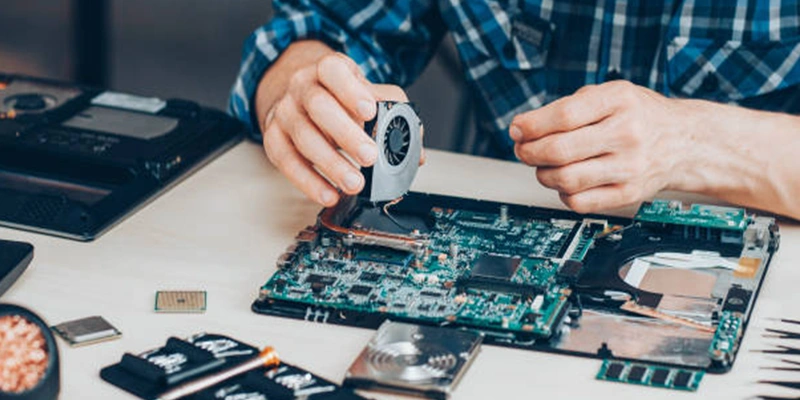
Our technicians work across hardware and software. That includes replacing parts, removing viruses, recovering files, setting up new computers and fixing home or office networks. Because they see the whole picture, they can spot when one problem is really caused by another.
Experience matters here. A technician who has seen the same fault many times recognises the pattern quickly. That means less time guessing, fewer unnecessary parts and a lower bill for you.
We also believe in honest advice. Sometimes the best fix is a small change you can make yourself. Sometimes a repair is not worth it. A good technician tells you both.
For ongoing support rather than a one off fix, see our IT support in Melbourne service.
Talk to a TechnicianThe problem keeps returning and online fixes have not worked.
Warnings about the drive, or files that vanish or will not open.
Pop ups, unknown programs or a possible scam call.
Work, study or business cannot wait while you troubleshoot.
What We Help With
From quick fixes to complex faults, these are the jobs people call a technician for most often.
Screens, batteries, keyboards, power faults and failed parts on laptops and desktops.
Desktop repairWindows and macOS errors, failed updates, crashes and programs that will not open.
Update errorsMalware removal, browser clean up and help securing accounts after a scam.
Virus removalRecovering files from failing drives and setting up reliable backups.
Data recoverySetting up a new computer and moving your files, email and programs across.
Setup serviceDropouts, dead spots, printers that will not connect and small office networks.
Network setupSolid state drives and memory upgrades that make older computers fast again.
UpgradesMacBook and iMac repairs, macOS problems and Apple account issues.
MacBook repairWays to Get Help
There is more than one way to work with a technician. The best option depends on the problem.
A technician comes to your home or office. This suits network problems, printer faults, setups and situations where several devices are involved.
For hardware repairs such as screens, batteries and board work, the workshop has the tools and parts needed. You drop the device off and collect it once it is ready.
Many software problems can be fixed remotely. With your permission, a technician connects to your computer over the internet and works on it while you watch. See remote IT support for details.
Not sure what you need. That is completely normal. A short call is often enough to work out whether you need a visit, a drop off or a remote session.
Choosing Well
Handing over a computer means handing over access to your files, photos and accounts. It pays to choose carefully. Here are practical things to look for.
A trustworthy technician explains what is wrong before quoting. Be wary of anyone who names a price before they have looked at the problem.
A written quote protects both sides. It sets out the work, the parts and the cost, so there are no surprises.
A professional technician only accesses what the repair needs and explains when they need your password or files.
Good technicians tell you when a repair is not worth it, even if it means less work for them.
You should understand what was done and why. If the explanation is full of jargon, ask for it in simpler terms.
Genuine companies do not call to say your computer is infected.
Warnings that tell you to call a number are almost always scams.
No legitimate technician asks to be paid in gift cards.
Common Calls
These are the most frequent reasons Melbourne customers reach out to us.
No power, a black screen or a start up loop. We find the cause and protect your files.
Will not startSlow start up and lagging programs usually have a clear cause and a practical fix.
Slow computerWiFi dropouts and no internet errors can be the device, the router or the connection.
Internet fixesForgotten passwords and locked accounts, solved without wiping your files where possible.
Password helpBlue screens and frozen programs traced to the real cause, hardware or software.
Freezing helpPrinters that will not connect, print or scan, at home or in the office.
Printer repairSomething else entirely. Call 0480 080 288 and describe it in your own words.
Be Prepared
A little preparation makes any appointment faster and cheaper. These steps help a technician focus on the fix.
Write down what happens, when it started and what you were doing. Screenshots or photos of error messages are very helpful.
Have your computer login, email and WiFi details ready. Many fixes need them to finish properly.
Tell the technician which files, programs or tasks are most important. That shapes the order of the work.
For on site visits, a clear desk near a power point makes it easier to open the computer, connect test equipment and work safely.
A good technician is happy to explain. Ask what caused the problem and how to avoid it in future.
Device details. Make and model if you know it.
Error messages. Photos or exact wording.
Passwords. Login, email and WiFi.
Priorities. What must work first.
Backup status. Whether files are backed up.
Who We Help
Different people need different kinds of help. Here is how our technicians adapt.
Many older customers simply want their email, photos and video calls to work reliably. We go at a comfortable pace, explain each step and leave written notes where helpful.
Family homes often have several laptops, tablets, a printer and a games console sharing one network. We sort out the whole setup so everyone can get online without fighting over the WiFi.
Study laptops carry assignments and research. We focus on keeping files safe and getting the laptop working before deadlines.
When you work for yourself, a broken computer is lost income. We prioritise getting you working again, then fix the underlying cause.
Small teams rarely have dedicated IT staff. Our technicians handle repairs, setups and network problems so your staff can stay focused on customers.
Designers, gamers and developers push their hardware hard. We understand demanding workloads and test repairs under realistic conditions.
Technician Tips
These simple habits prevent a large share of the problems we are called out to fix.
An external drive or cloud backup turns a disaster into an inconvenience.
Interrupted updates cause many start up problems. Leave the computer on until they complete.
Unexpected emails, links and pop ups are the main route for scams and malware.
Dust and heat shorten the life of every computer. Keep vents clear and surfaces hard.
The fifth habit is simple. Ask for help early. Small problems are almost always cheaper to fix than big ones.
Costs
Every job is different, so we quote after understanding the problem. These are the main factors.
| Service | What It Covers | Cost Factor |
|---|---|---|
| Diagnosis | Finding the cause of the fault | Free of charge in the workshop |
| Remote Session | Software fixes over the internet | Time required |
| On Site Visit | Technician attends your location | Location and scope |
| Hardware Repair | Replacing failed parts | Part and model |
| Data Recovery | Recovering files from failing drives | Drive condition |
| Setup and Transfer | New computer setup and file move | Amount of data and programs |
For a quote, call 0480 080 288 and describe what you need help with.
Process
Simple steps from your first call to a working computer.
Describe the problem and we suggest the best way to help.
On site, drop off or remote, depending on the fault.
We find the cause and confirm the cost before work.
We fix the problem and explain what was done.
Melbourne
Our computer technician Melbourne service supports households, seniors, students, home offices and small businesses across the city. Many problems are solved in a single visit or session.
Whether the problem is a single laptop or a whole home network, our computer technician Melbourne team starts by listening. The details you share in the first few minutes often point straight to the cause.
We are especially patient with people who feel less confident with technology. There is no such thing as a silly question, and we take the time to explain things clearly.
See our areas we serve for coverage, or our small business IT support page for ongoing business help.
Book a Computer TechnicianClear explanations. No jargon.
Confirmed costs. Before work starts.
Privacy respected. Only what the job needs.
Honest advice. Repair or replace.
Further Reading
Hand picked articles that go deeper on this job.
Friendly, practical help for homes and businesses across Melbourne. Call or email to book.
Common questions
What people ask before booking a technician.
Yes. On site visits suit network, printer, setup and many software problems.
Hardware repairs that need parts are usually completed in the workshop.
Many software problems can be fixed remotely with your permission, while you watch.
Hardware faults need hands on work.
The cost depends on the problem, the time needed and any parts.
We confirm the price before any work begins.
Yes. We help with Windows laptops and desktops, MacBooks and iMacs.
We also help with printers and networks used alongside them.
Legitimate technicians diagnose before quoting, provide written quotes and never call out of the blue claiming your computer is infected.
Never pay with gift cards or give remote access to unknown callers.
Often yes, so we can test the computer properly after the fix.
We only access what the job requires and explain why.
Absolutely. We are patient, explain things simply and are happy to show you how to avoid the problem in future.
Family members are welcome to join the visit.
Yes. We help small offices with repairs, setups, networks and ongoing support.
See our small business IT support page for more.