Dell Laptop Battery Replacement
XPS internal batteries are glued and need careful removal, which we do safely.
Dell repair details
Laptop Battery Replacement Melbourne
A laptop that will not hold charge or has a swollen battery is more than an annoyance, it can be a safety risk. Our Melbourne team handles laptop battery replacement for every major brand, often the same day, using quality cells.
When to Replace
Every laptop battery wears out. After a few years it holds less charge, then much less, until the laptop dies the moment you unplug it. A laptop battery replacement restores all day use without the cost of a new machine.
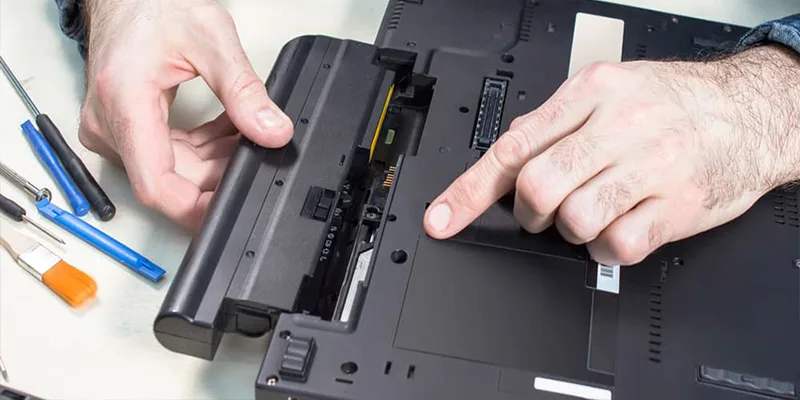
Related services: Laptop won't charge.
The warning signs are clear. The laptop won't hold charge, the battery drains fast, the laptop dies when unplugged, or the system reports the battery is not charging even when plugged in. Any of these means the battery is at end of life.
One sign needs urgent action. A swollen laptop battery, where the case bulges or the trackpad lifts, is a safety hazard. Stop using the laptop and book a replacement straight away. When you replace laptop battery Melbourne wide with us, we handle swollen batteries safely every week.
Below we cover the brand specific notes, the safe checks you can do, and how our laptop battery repair Melbourne service gets your runtime back, usually the same day.
Get a Battery QuoteThe laptop won't hold charge for more than a short time, or drops percentage very quickly under light use.
The laptop dies when unplugged the instant the charger is removed. The battery no longer holds usable power.
A swollen laptop battery bulges the case or lifts the trackpad. This is a safety risk and needs urgent replacement.
The system shows the laptop battery not charging while plugged in, or reports the battery as not detected.
Every Brand Covered
Battery type, size and access vary by brand and model. Find your brand below for our specific notes, then book a battery replacement.
XPS internal batteries are glued and need careful removal, which we do safely.
Dell repair detailsMost modern HP batteries are internal, and we fit quality matched cells.
HP laptop serviceSome ThinkPad models keep a removable battery, which is a quick swap.
Lenovo repairsGaming Nitro and Predator batteries are larger capacity, which we match exactly.
Acer repairsROG gaming batteries are high capacity, and ZenBook cells are slim line. We match the exact part.
ASUS laptop serviceMacBook battery replacement covers Air and Pro models. Apple batteries are glued in and need careful safe removal.
MacBook repairsThe Surface battery is deep inside a glued chassis, so this is specialist work we handle carefully.
Surface Pro RepairMany older Satellites have a removable battery for a fast swap, newer ones are internal.
Toshiba Laptop RepairSymptoms We Fix
A failing battery shows in several ways. Find your symptom below. Each one is a battery job we handle every working day across Melbourne.
The laptop won't hold charge, dropping fast even under light use. The cells have lost capacity with age. A quality replacement battery restores full runtime.
Fix Charge HoldingThe laptop battery draining fast, going from full to empty in well under an hour. Worn cells cannot store charge. We fit a new battery and verify the runtime.
Fix Fast DrainThe laptop plugged in not charging, sitting at a fixed percentage. This can be the battery, the charger or the charge circuit. We diagnose the exact cause.
Fix Not ChargingThe laptop dies when unplugged the moment the charger is removed. The battery holds no usable charge. A replacement restores portable use.
Fix Dies UnpluggedLaptop battery swelling that bulges the case or lifts the trackpad is a safety hazard. Stop using the laptop now. We remove and replace swollen batteries safely.
Fix Swollen BatteryThe system reports laptop battery not detected even though one is fitted. This is often a connector or board fault, not always the battery. We test and confirm.
Fix Not DetectedA battery that gets very hot during use is degrading and unsafe. Heat shortens its life further and risks the laptop. We replace it with safe quality cells.
Fix Hot BatteryThe laptop shuts down without warning at twenty or thirty percent. The battery can no longer deliver steady power. A new battery stops the random shutdowns.
Fix ShutdownsIf your battery is swollen, stop using the laptop and call us now on 0480 080 288. A swollen battery is a safety issue we treat as urgent.
Check First
Before booking a laptop battery replacement, a few safe checks confirm the battery is the real problem and not the charger. None of these need you to open the laptop.
On Windows, a battery report shows the design capacity against the current full charge. A large gap confirms a worn battery. On a MacBook, the battery condition shows in system settings.
If the laptop will not charge, test with another compatible charger if you have one. A faulty charger can mimic a dead battery. This quick check saves time.
Close the lid and look for a gap, a wobble on a flat surface, or a raised trackpad. Any swelling means you should stop using the laptop and book an urgent replacement.
Time how long the laptop lasts on battery from full. A runtime far below normal for the model is a clear sign the cells are spent and need replacing.
Call us right away if the battery is swollen, gets very hot, or the laptop shuts down suddenly. These are safety issues. Also call if the battery health is very low or the laptop will not run unplugged at all.
Note the symptom. Won't hold charge, drains fast, dies unplugged, not charging, or swelling.
Check for swelling. If the case bulges or the trackpad lifts, treat it as urgent and tell us.
Find the model. The model number on the base lets us match the exact battery and price.
Bring the charger. We test the charger too, since it can mimic a battery fault.
Back up your data. A battery swap is low risk, but a backup is always good practice.
Have your password ready. We test charge and runtime, which needs system access.
Ask for a written quote. We give one as standard.
What It Costs
The laptop battery replacement cost depends mostly on the battery itself and how it is fitted. The laptop battery price Melbourne customers pay is set by the cell type. These are the things that change the figure. You get a firm written quote before any work, and the diagnosis is free.
| Battery Type | What It Covers | Cost Factors |
|---|---|---|
| Diagnostic Service | Confirm battery versus charger or board fault | Included free |
| Removable Battery | External clip in battery swap | The most affordable, quick to fit |
| Internal Battery | Battery inside a screwed access panel | Moderate, depends on model and labour |
| Glued Internal Battery | Adhesive mounted ultrabook or MacBook cell | Higher, careful safe removal required |
| High Capacity Gaming | Large cell gaming laptop battery | Premium part cost, model specific |
| Swollen Battery Removal | Safe removal and disposal plus new cell | Treated as urgent, safe handling included |
| Charge Circuit Repair | Board level charging fault, not the battery | Depends on whether soldering is required |
For a real figure on your model, call 0480 080 288 with the model number for a free same day battery replacement Melbourne quote.
How It Works
From the first call to all day battery life again, here is exactly how our laptop battery repair Melbourne service works.
Call or message us the model number and the symptom. We confirm battery availability and give you an indicative price.
Bring it to the workshop, or have a technician come to you, any day Monday to Saturday.
We confirm the battery is the fault, not the charger or board, and give a written quote before any work begins.
We fit quality cells, test the charge and runtime, and recycle the old battery safely before you collect.
Battery Swaps
A battery that drops from 40 percent to zero, or a case that has started to bulge, needs attention. A swollen battery should not be charged at all.
We read the battery health report first, then fit a replacement matched to your model.
Book a Battery Replacement TodayHealth report read. So you know it is the battery.
Swollen batteries. Removed safely.
Matched replacements. Correct capacity for your model.
Old battery recycled. Disposed of properly.
Further Reading
Background reading before you book.
Same day battery replacement Melbourne is available for common models. Free quotes in every suburb, and nothing to pay if we cannot repair it. Call or email now.
Common questions
What people ask us most. Other questions are welcome on the phone.
The laptop battery replacement cost depends on the battery and how it is fitted. A removable battery is the most affordable. Glued internal and high capacity gaming batteries cost more.
The price goes in writing before any work. Give us your model number for an accurate price.
Usually yes, if the rest of the laptop is healthy. A laptop battery replacement restores full portable use for a fraction of the cost of a new laptop.
We give honest advice. If the laptop is very old and a battery is not worth it, we tell you plainly first.
Yes. A swollen laptop battery is a genuine safety risk. Stop using and stop charging the laptop, and book an urgent replacement. Do not press on the battery or try to remove it yourself.
We handle swollen batteries safely every week and treat them as a priority job.
Sometimes. A laptop plugged in not charging can be the battery, the charger, or the charge circuit on the board. The fault is not always the battery itself.
We diagnose the exact cause as part of the free quote, so you only pay for the real fix.
Yes, for common batteries that are readily available. Many removable and standard internal batteries are replaced the same day. Premium and glued cells may need a day to order in.
Call early with your model number and we will confirm whether same day battery replacement Melbourne is possible.
No. A battery replacement does not touch your storage drive, so your files and settings stay exactly as they are.
Your data is never at risk during a routine battery swap.
Most laptop batteries give good service for two to four years of regular use, depending on charge habits and heat. After that, capacity drops noticeably and runtime gets short.
If your laptop won't hold charge like it used to, a replacement brings the runtime back.
Yes. We do laptop battery replacement for Dell, HP, Lenovo, Acer, Asus, Apple MacBook, Microsoft Surface and Toshiba. Each brand has its own battery type and our technicians know them.
Call us with your brand and model.
The most common are fast draining, the laptop shutting down while the battery still shows charge, the battery not charging past a certain percentage, the laptop only running when plugged in, and a swollen battery lifting the case or trackpad.
Most of these mean the battery has worn out and needs replacing. A swollen battery is a safety risk, so stop using the laptop and get it checked.