ASUS Motherboards
ROG, TUF, Prime and ProArt boards often include Q LED diagnostics and firmware recovery features. We use these before considering replacement.
ASUS computer repair
Desktop and Gaming PC Boards
When a desktop will not start, the motherboard often gets the blame. Sometimes it is guilty, and often it is not. Our motherboard repair Melbourne service tests the whole system first, confirms whether the board has really failed, and then repairs, recovers or replaces it with honest advice at every step.
Start Here
The motherboard is the backbone of a desktop computer. Every other part plugs into it, from the processor and memory to the graphics card and storage. When it misbehaves, the whole computer stops making sense.
That is exactly why board faults are so often misdiagnosed. A failing power supply, one bad memory stick, or a loose cable can produce the same symptoms as a dead motherboard. Replacing the board in those cases wastes money and fixes nothing.
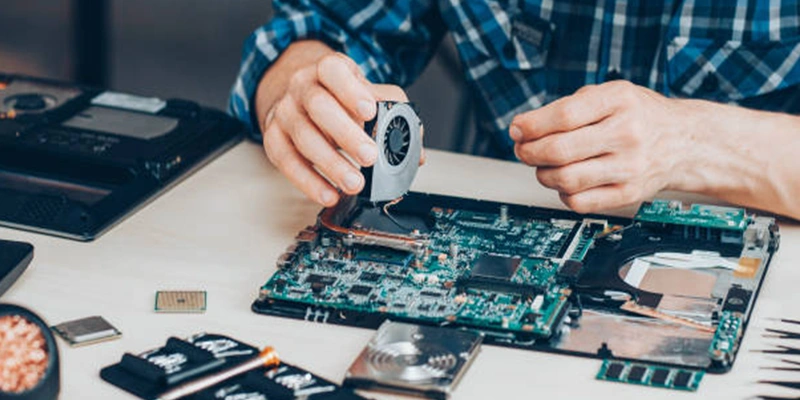
A proper motherboard repair starts by ruling out everything else. Only when the board is confirmed as the fault do we look at how to fix it. That might mean firmware recovery, a component level repair, or a compatible replacement board.
Desktop boards are different from laptop boards. They are larger, built to standard sizes, and usually easier to replace. For notebooks, our laptop motherboard repair page covers board level work on portable models.
This page focuses on desktops, gaming PCs and workstations, including custom builds that mix parts from many makers. If you have been searching for motherboard repair Melbourne wide and keep finding laptop only services, you are in the right place.
Get a Free DiagnosisNo lights or fans even with a known good power supply.
A CPU, DRAM, VGA or BOOT light that never clears.
USB, audio or network ports that stop working together.
Burn marks, swollen parts, bent socket pins or corrosion.
Board Brands
Each manufacturer has its own diagnostic tools, firmware recovery options and design habits. Knowing them speeds up an accurate diagnosis.
ROG, TUF, Prime and ProArt boards often include Q LED diagnostics and firmware recovery features. We use these before considering replacement.
ASUS computer repairMSI boards are popular in gaming builds. We see firmware, power delivery and memory compatibility faults, especially after upgrades.
Gigabyte boards appear in both budget and enthusiast systems. Dual firmware on some models can help recover from a failed update.
ASRock boards offer strong value. Faults often involve power phases under heavy load or settings that push memory beyond stable limits.
Older Intel branded boards still run many office and home computers. Parts can be harder to source, so we explain options early.
EVGA boards are found in enthusiast builds. Diagnosis focuses on power delivery, firmware and compatibility with the installed parts.
Dell, HP, Lenovo and Acer desktops use custom boards. These often need model specific parts, which we source and fit.
Dell computer repairWorkstation boards support large memory and professional graphics. Faults can be subtle, so we test thoroughly under realistic loads.
Faults
These are the board related problems we see most often in desktops. Each one has a clear diagnostic path.
If a tested power supply cannot wake the board, the fault may sit in the board's power circuits. Some can be repaired at component level.
No power helpFans spin but the system never finishes its start up checks. Memory, processor seating, firmware or the board itself can all be responsible.
Book a diagnosisAn update interrupted by a power cut or crash can leave a board unable to start. Recovery is often possible without replacing the board.
Ask about BIOS recoveryFitting a processor carelessly can bend delicate socket pins. Careful straightening sometimes works, while serious damage needs a new board.
Get socket advicePorts that stop working may need a driver fix, a header repair, or attention to damaged circuits on the board.
Fix dead portsUnstable power delivery or overheating voltage regulators can cause restarts under load. We test under realistic conditions to confirm.
Restart causesSpills, leaking coolers and power surges can corrode or burn board components. Fast action improves the chance of repair.
Report damageCrashes that survive a fresh Windows setup and new memory may point to the board. We test methodically before reaching that conclusion.
Blue screen guideNot sure if it is the board. Call 0480 080 288 and describe what happens when you press power.
Our Method
A reliable diagnosis follows a logical order. Skipping steps leads to wrong answers, so we work through the system one part at a time.
We check the supply with proper equipment and, where needed, swap in a known good unit. A weak supply is the most common impostor for a dead board.
We remove everything that is not essential, leaving the board, processor, one memory stick and cooling. If the system starts, we add parts back until the fault returns.
Memory, graphics and processors are tested with known good spares. This isolates the faulty part with confidence.
We look for swollen capacitors, burn marks, corrosion and socket damage. Many physical faults are visible once you know where to look.
Corrupted or outdated firmware can cause start up failures and instability. We use the board's own recovery tools before considering anything drastic.
Can prevent start up or cause random shutdowns.
One bad stick can stop the whole system booting.
Causes black screens that look like a board fault.
Front panel and power cables are easy to disturb.
Your Options
Once the board is confirmed faulty, there are three main paths. We explain which suits your computer and budget.
When the hardware is healthy but the firmware is corrupted, recovery is often the quickest and cheapest fix. Many modern boards include built in recovery tools for exactly this situation.
Some faults come down to one failed component, such as a power circuit part or a damaged port. Repairing that single part can save a board that would otherwise be thrown away.
When damage is widespread, a replacement board is the sensible choice. We match it to your processor, memory, case size and operating system needs.
On an older computer, replacing the board, processor and memory together may make more sense than hunting for an old part. We outline the cost so you can compare it with a new computer.
Do and Do Not
A suspected board fault can feel stressful. These steps keep your computer and your data safe until we can look at it.
If you smell burning or see smoke, switch off at the wall immediately and unplug the computer. Do not try to start it again.
Record any diagnostic LED, code display or beep pattern. Photos are ideal. These details shorten the diagnosis.
New parts, firmware updates, power outages and overclocking are all useful history. Tell us everything, even if it seems minor.
Turning a faulty computer on and off many times can worsen damage. One or two attempts are enough.
It is tempting to pull parts out and swap them around. Unless you are confident, leave the system as it is. Bringing it in complete lets us test the exact combination that failed.
Board model. Printed on the board or listed on the box.
Main parts. Processor, memory, graphics card and power supply.
Fault history. When it started and what changed.
Data priorities. Files that must be protected.
Budget preference. Repair only, or open to upgrades.
Costs
Board work varies widely, so every quote follows a full diagnosis. These are the main things that shape the price.
| Work Type | Description | Cost Factor |
|---|---|---|
| Diagnosis | Full system testing to confirm the fault | Free of charge |
| Firmware Recovery | Restore corrupted or failed BIOS | Board recovery options |
| Connector Repair | Ports, headers and sockets | Extent of the damage |
| Component Repair | Replace failed board components | Component type and access |
| Board Replacement | Supply and fit a compatible board | Board model and availability |
| Platform Upgrade | Board, processor and memory together | Parts chosen |
For an initial view, call 0480 080 288 with the board model and the symptoms.
Process
Four clear stages, with your approval before any cost.
Tell us the board model, main parts and symptoms by phone or email.
Drop off the whole computer so we can test every part together.
We confirm the fault and give a written quote with your options.
We complete the work and test the system under load before return.
Melbourne
We help gamers, home users, creators and businesses across Melbourne with desktop board faults. Turnaround depends on the fault and whether parts need ordering.
Our motherboard repair Melbourne service suits all kinds of desktops. Home office towers, school computers, streaming rigs and design workstations all come through the workshop, and each gets the same patient testing.
We also help people who built their own PC and now feel stuck. Building a computer is satisfying until something stops working. We can take over the diagnosis, explain what went wrong in plain language, and suggest parts that suit the rest of your build.
If the board cannot be saved, your files usually can. The storage drive normally survives a board failure, and we can move your data to the repaired or replacement system.
Explore gaming PC repair or desktop repair for related services.
Book a Board DiagnosisWhole system testing. We prove the fault first.
Clear options. Repair, recover or replace.
Data protection. Your files come first.
Load testing. Stability confirmed before return.
Further Reading
Step by step articles from the same workshop.
Free diagnosis, written quotes and no fix means no fee. Call or email to book your desktop in.
Common questions
What people ask most about desktop board problems.
Signs include no response with a working power supply, a diagnostic light that never clears, or visible damage on the board.
Because other parts can cause the same symptoms, proper testing is the only reliable way to be sure.
Often yes. Firmware faults, damaged ports and single failed components can frequently be repaired.
Widespread damage usually means a replacement board is better value.
On a recent computer, usually yes. On an older system, upgrading the board, processor and memory together may be smarter.
We compare the options with the cost of a new computer so you can decide.
Usually not. Your files live on the storage drive, which normally survives a board failure.
We protect and transfer your data as part of the repair.
In many cases, yes. Many boards include recovery features, and some have backup firmware.
We try recovery before suggesting any replacement.
It depends on the fault, the board and the parts needed. Firmware recovery is usually cheaper than a replacement board.
Diagnosis is free and every quote is in writing.
Yes. We diagnose and repair boards from ASUS, MSI, Gigabyte, ASRock and other makers used in gaming builds.
Every repaired system is tested under load before return.
Yes. Laptop board repair is covered on our dedicated laptop motherboard repair page.
This page focuses on desktop, gaming and workstation boards.